
As Large Language Models (LLMs) become embedded in daily software engineering and enterprise operations, infrastructure teams are hitting a hard wall with commercial cloud APIs: runaway per-token billing, token rationing, and strict regulatory requirements around data sovereignty.
A standout real-world example is British fintech Revolut, which recently made headlines—“British fintech Revolut slashes AI coding costs 10x by cutting out Claude and going self-hosted” ↗—after moving its default AI coding workload off commercial APIs onto self-hosted GPUs.
In this post, we break down the numbers from Revolut’s AI Engineer NYC 2026 talk ↗ (“Shipping like a startup, regulated like a bank”), and demonstrate how our OpenStack-Helm + FluxCD platform—built on top of our automated Kubernetes cluster—makes provisioning GPU/accelerator-backed VMs for self-hosted LLMs effortless using OpenStack Cyborg (examples/05-cyborg.md ↗).
Why Self-Hosted GPUs Beat Commercial LLM APIs: The Revolut Case Study#
At AI Engineer NYC 2026 ↗, David Abitbol (Head of AI Operations and Infrastructure at Revolut) shared how a regulated bank with roughly 2,000 software engineers re-architected its AI stack by moving from commercial SaaS APIs to dedicated GPU infrastructure:
| Metric / Dimension | Commercial Frontier APIs (Before) | Self-Hosted GPU Cluster (After) |
|---|---|---|
| Primary Model | Anthropic Claude Code / OpenAI Codex | Self-hosted GLM-5.1 / GLM-5.3 (754B MoE open-weight) |
| GPU Infrastructure | External SaaS (per-token billing) | 56 NVIDIA B200 GPUs (seven 8-GPU DGX nodes) |
| Cost per Engineer / Token | $1,000 – $10,000 / month per heavy user | ~$0.30 per million tokens (10x cost reduction / ~90% savings) |
| Developer Behavior | Token caps caused token hoarding (skipping docs, tests, Jira triage) | Unlimited flat usage across all daily workflows (Claude kept as exception-only) |
| Engineering Impact | Hard to justify ROI under strict rationing | 60% faster coding time and 70% shorter lead time (task to merge) |
Key Takeaways from Revolut’s Shift#
- The Token Rationing Trap: When API bills reached $1,000–$10,000 per engineer per month, imposing token budgets backfired—engineers hoarded their allowance for only the hardest problems and stopped using AI for everyday tasks like debugging, documentation, and ticket triage.
- Fixed-Cost GPU Economics at Scale: Serving a 754-billion-parameter Mixture-of-Experts (MoE) model across 56 NVIDIA B200 GPUs brought blended inference costs down to $0.30 per million tokens, cutting total AI coding spend by 10x while removing usage caps completely.
- Shipping Like a Startup, Regulated Like a Bank: Running open-weight models on dedicated GPU hardware keeps proprietary source code, customer telemetry, and regulated banking data strictly inside the company’s security boundary with predictable, flat infrastructure costs.
Declarative Accelerator Management with OpenStack Cyborg#
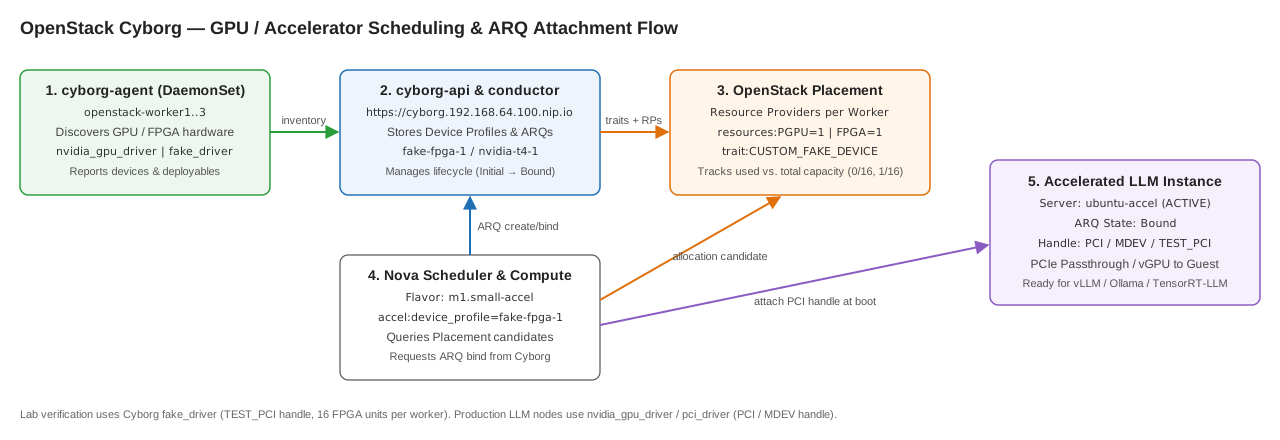
Traditionally, attaching GPUs or FPGAs to OpenStack VMs required brittle manual nova.conf PCI passthrough allowlists on every compute host. In our OpenStack-Helm GitOps deployment, we solve this cleanly by deploying OpenStack Cyborg (2026.2) alongside Nova and Placement.
How the Cyborg + Placement + Nova Workflow Works#
- Discovery (
cyborg-agent): A DaemonSet running on every worker node (openstack-worker1..3) inspects local hardware using enabled drivers (nvidia_gpu_driver,pci_driver, orfake_driver) and reports discovered devices tocyborg-apiandcyborg-conductor. - Inventory Registration (
Placement): Cyborg registers a child resource provider per node in OpenStack Placement (exposing resource classes likePGPUorFPGAand hardware traits such asCUSTOM_NVIDIA_TESLA_T4orCUSTOM_FAKE_DEVICE). - Device Profiles: Administrators define a named Device Profile (e.g.,
nvidia-t4-1orfake-fpga-1) specifying the exact accelerator resource count and required traits. - Flavor Mapping: Standard Nova flavors reference that profile via a single property:
accel:device_profile=<profile-name>. - Automated Binding at Boot (
ARQ): When a user boots a VM with that flavor, Nova queries Placement for a host with free accelerator capacity, instructs Cyborg to create and bind an Accelerator Request (ARQ), and attaches the resulting PCI/vGPU handle directly to the Libvirt guest.
Prerequisite & Lab vs. Bare-Metal GPU Parity: This walkthrough is valid once you have completed the OpenStack-Helm + FluxCD deployment on top of the Kubernetes cluster, where
cyborg,nova, andplacementare already running in theopenstacknamespace. Because our lab worker nodes run inside virtual machines without physical GPUs, we validate the entire end-to-end scheduling and Placement pipeline using Cyborg’s built-infake_driver(which exposes 16FPGAunits per worker with attach handle typeTEST_PCI). On bare-metal GPU hosts, switchingenabled_driverstonvidia_gpu_driveruses the exact same workflow and passes the physicalPCI/MDEVhandle straight into the VM for CUDA and vLLM.
Step-by-Step Guide: Provisioning an Accelerator-Backed VM#
All steps below run on the deployed OpenStack-Helm cluster and follow examples/05-cyborg.md ↗ from the fluxcd-arm branch of the repository.
Step 1: Enable the Accelerator Driver via GitOps#
In clusters/prod/region1/openstack/values/cyborg.yaml, enable the desired driver on the cyborg-agent DaemonSet and let FluxCD roll out the change:
conf:
  cyborg:
    agent:
      enabled_drivers:
- fake_driver # Use nvidia_gpu_driver or pci_driver on bare-metal GPU nodesReconcile the HelmRelease with FluxCD:
flux reconcile kustomization openstack -n flux-system --with-source
flux reconcile helmrelease cyborg -n openstack
kubectl rollout status ds -n openstack -l application=cyborg,component=agentStep 2: Launch an Interactive OpenStack Client Pod#
Start an osc client pod inside the openstack namespace pre-wired with the Keystone admin credentials:
kubectl run osc -n openstack --restart=Never \
  --image=registry.gitlab.com/openstack7461002/openstack-helm-images/openstack-client:2026.2 \
  --overrides='{"spec":{"containers":[{"name":"osc",
    "image":"registry.gitlab.com/openstack7461002/openstack-helm-images/openstack-client:2026.2",
    "command":["sleep","infinity"],
    "envFrom":[{"secretRef":{"name":"keystone-keystone-admin"}}],
    "env":[{"name":"OS_INTERFACE","value":"internal"}]}]}}'
kubectl wait -n openstack --for=condition=Ready pod/osc --timeout=120s
alias osc='kubectl exec -i -n openstack osc -- openstack'Step 3: Create the Device Profile and Accelerator Flavor#
Define a Cyborg device profile requesting 1 accelerator unit and bind it to a Nova flavor (m1.small-accel):
# Create the device profile (for a physical NVIDIA T4 GPU, use resources:PGPU=1 and trait:CUSTOM_NVIDIA_TESLA_T4=required)
osc accelerator device profile create fake-fpga-1 \
  '[{"resources:FPGA": "1", "trait:CUSTOM_FAKE_DEVICE": "required"}]'

# Create a Nova flavor referencing the device profile
osc flavor create m1.small-accel --vcpus 1 --ram 2048 --disk 10 \
--property accel:device_profile=fake-fpga-1Step 4: Boot the Accelerated VM#
Launch an Ubuntu 24.04 instance using the m1.small-accel flavor:
osc server create ubuntu-accel \
  --image ubuntu-24.04-arm64 \
  --flavor m1.small-accel \
  --network private-net \
  --key-name mykey \
  --security-group ssh-icmp \
--waitLive Verification: Inspecting ARQ Bindings and Placement Capacity#
Once ubuntu-accel is ACTIVE, we can inspect the bound Accelerator Request (ARQ), the discovered hardware across openstack-worker1..3, and the real-time resource consumption in OpenStack Placement:
# 1. Which VMs hold an accelerator (one ARQ per device in use)
osc accelerator arq list
#    state Bound + instance_uuid = in use by that VM

# 2. Accelerators per node (and how many each one exposes)
osc accelerator device list
osc accelerator deployable list -c uuid -c name -c num_accelerators -c device_id

# 3. Capacity vs. used, per node (Placement view, resource class FPGA)
for rp in $(osc resource provider list -f value -c uuid -c name | awk '$2 ~ /FAKE|FPGA|_/ {print $1}'); do
  echo "== $(osc resource provider show $rp -f value -c name)"
  osc resource provider inventory list $rp -c resource_class -c total -c used
  osc resource provider usage show $rp
done

# 4. Nodes that can still give out a free accelerator
osc allocation candidate list --resource FPGA=1 -c "resource provider" -c "inventory used/capacity"Cluster Output#
root@openstack-master1:~# kubectl run osc -n openstack --restart=Never \
  --image=registry.gitlab.com/openstack7461002/openstack-helm-images/openstack-client:2026.2 \
  --overrides='{"spec":{"containers":[{"name":"osc",
    "image":"registry.gitlab.com/openstack7461002/openstack-helm-images/openstack-client:2026.2",
    "command":["sleep","infinity"],
    "envFrom":[{"secretRef":{"name":"keystone-keystone-admin"}}],
    "env":[{"name":"OS_INTERFACE","value":"internal"}]}]}}'
kubectl wait -n openstack --for=condition=Ready pod/osc --timeout=120s
alias osc='kubectl exec -i -n openstack osc -- openstack'
pod/osc created
pod/osc condition met

root@openstack-master1:~# osc accelerator arq list
+--------------------------------------+-------+---------------------+--------------------------------------+--------------------+-----------------------------------------------------------------+
| uuid                                 | state | device_profile_name | instance_uuid                        | attach_handle_type | attach_handle_info                                              |
+--------------------------------------+-------+---------------------+--------------------------------------+--------------------+-----------------------------------------------------------------+
| 411ad9c5-b9c0-48e3-b393-dcb80c7d3e93 | Bound | fake-fpga-1         | 69c26edd-9f6b-4d95-b0a5-557e692d7818 | TEST_PCI           | {'domain': '0000', 'bus': '0c', 'device': '0', 'function': '1'} |
+--------------------------------------+-------+---------------------+--------------------------------------+--------------------+-----------------------------------------------------------------+

root@openstack-master1:~# osc accelerator device list
+--------------------------------------+------+--------+-------------------+------------------------------------------------+
| uuid                                 | type | vendor | hostname          | std_board_info                                 |
+--------------------------------------+------+--------+-------------------+------------------------------------------------+
| c386056e-13b9-4441-8fc4-9e58d74cd4b0 | FPGA | 0xABCD | openstack-worker3 | {"device_id": "0xabcd", "class": "Fake class"} |
| 281201b1-a692-4f81-b6fb-cf6deb070bec | FPGA | 0xABCD | openstack-worker2 | {"device_id": "0xabcd", "class": "Fake class"} |
| 7758f1b0-5012-4f3d-a955-43b14e3fad8d | FPGA | 0xABCD | openstack-worker1 | {"device_id": "0xabcd", "class": "Fake class"} |
+--------------------------------------+------+--------+-------------------+------------------------------------------------+

root@openstack-master1:~# osc accelerator deployable list -c uuid -c name -c num_accelerators -c device_id
+--------------------------------------+------------------------------+-----------+
| uuid                                 | name                         | device_id |
+--------------------------------------+------------------------------+-----------+
| 163a750a-e49d-4b3b-b654-4b54ab101fad | openstack-worker3_FakeDevice |         3 |
| d627b381-72ec-431a-a03f-ba54719ba738 | openstack-worker2_FakeDevice |         6 |
| 1f1d5c01-c69b-4a17-a753-438e387f6f9f | openstack-worker1_FakeDevice |         9 |
+--------------------------------------+------------------------------+-----------+

== openstack-worker3_FakeDevice
+----------------+-------+------+
| resource_class | total | used |
+----------------+-------+------+
| FPGA           |    16 |    0 |
+----------------+-------+------+
+----------------+-------+
| resource_class | usage |
+----------------+-------+
| FPGA           |     0 |
+----------------+-------+
== openstack-worker2_FakeDevice
+----------------+-------+------+
| resource_class | total | used |
+----------------+-------+------+
| FPGA           |    16 |    1 |
+----------------+-------+------+
+----------------+-------+
| resource_class | usage |
+----------------+-------+
| FPGA           |     1 |
+----------------+-------+
== openstack-worker1_FakeDevice
+----------------+-------+------+
| resource_class | total | used |
+----------------+-------+------+
| FPGA           |    16 |    0 |
+----------------+-------+------+
+----------------+-------+
| resource_class | usage |
+----------------+-------+
| FPGA           |     0 |
+----------------+-------+

root@openstack-master1:~# osc allocation candidate list --resource FPGA=1 -c "resource provider" -c "inventory used/capacity"
+--------------------------------------+-------------------------+
| resource provider                    | inventory used/capacity |
+--------------------------------------+-------------------------+
| bbaa59cb-7daf-3c03-840c-c84ba12d0cf8 | FPGA=0/16               |
| 4e1a39dc-122e-38b1-97bb-29cd76bf6a18 | FPGA=1/16               |
| 7a9282fc-a9cb-379f-8120-f75084a68221 | FPGA=0/16               |
+--------------------------------------+-------------------------+As shown in the output above:
- ARQ
411ad9c5-b9c0-48e3-b393-dcb80c7d3e93isBoundto instance69c26edd-9f6b-4d95-b0a5-557e692d7818(ubuntu-accel) with PCI coordinates0000:0c:00.1. - Placement tracks the accelerator allocation on
openstack-worker2_FakeDevice(FPGA=1/16), whileopenstack-worker1andopenstack-worker3remain at0/16.
Running Instance in Skyline#
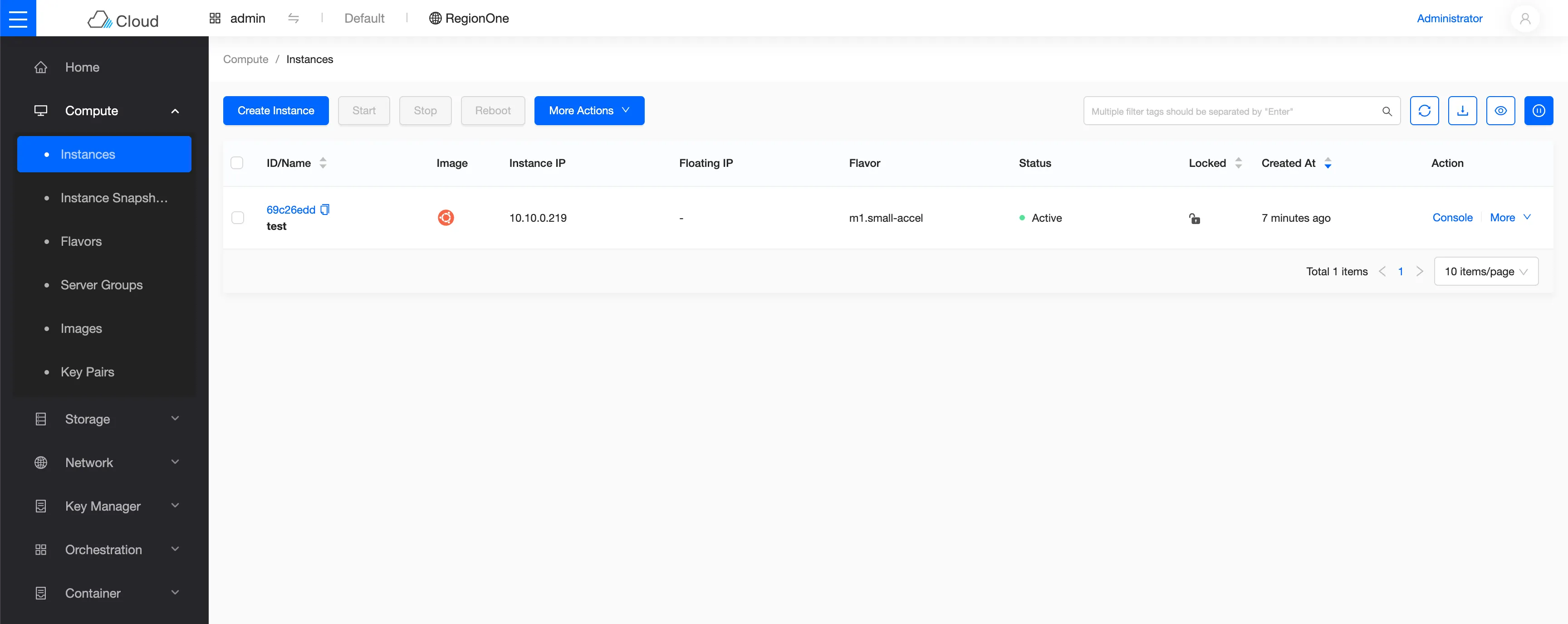
In the Skyline dashboard (https://skyline.192.168.64.100.nip.io), the ubuntu-accel instance appears Active with the accelerator-enabled flavor:
Conclusion#
By combining Kubernetes, OpenStack-Helm, FluxCD, and Cyborg, infrastructure teams can offer self-service GPU and FPGA instances with the same GitOps repeatability as standard compute VMs—enabling low-latency, privacy-preserving LLM inference at enterprise scale.